








SWITCH KVM · PLANET
Switch KVM, rack 19 pouces
Le PLANET IKVM-210-16 est un switch KVM de la gamme PLANET. D’après la fiche PLANET : 16 ports réseau, débit maximal Gigabit, rack 19 pouces et fonctionnement de -10 à 50 °C. Les spécifications détaillées et la documentation officielle PLANET figurent plus bas sur cette page.

Conception et intégration réseau de IKVM-210-16.
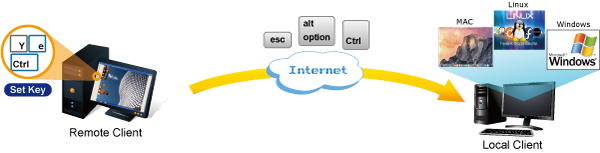
Multiple Operating Systems Supported
Remote Key Combination You could set the multiple key combinations at IKVM Series. When you open IKVM software at remote client, you could use these key combinations to control these local PCs with a different OS via the internet.

Remote Key Combination
Computer Switching There are three convenient methods to access any computer connected to the installation:
Computer Switching
Perceptive LED Display You could check the computer status on the front LED of the IKVM-210-16. "Red" indicates that a computer is connected to the corresponding port and "Green" indicates that the computer connected to the corresponding port has focus.

Applications et cas d’usage de IKVM-210-16.
Remote Management via Network
Remote Management via Network With PLANET IKVM-210-16, network administrators can control a server room locally or remotely through Internet. No additional software or license fee is needed; multiple users can securely access remote server by using a standard web browser to create an HTTP connection. Cascade Operation The IKVM-210-16 is easy to install for controlling up to 16 computers/servers. Furthermore, sixteen KVM switches can be cascaded t

Fonctionnalités et technologies clés de IKVM-210-16.
Hardware
- 1U rack-mount size and desktop design
- Standalone machine controls up to 16 sets of computers
- Up to 2 levels can be cascaded and up to 256 computers can be controlled
- Front panel status LEDs give a clear indication of the active computers
Security
- Two-layer password security protection
- DES, AES and 3DES for data encryption
Management
- Auto scan mode for monitoring computers
- Requires no additional software or hardware
- Computer selection via Port Select Button, Hotkey and On Screen Display (OSD)
- Hot pluggable: Add or remove computers without having to power down the switch
- QVS (Quick View Setting): Quickly select your computer by naming its model or serial number
Remote Access
- Remotely control PC via TCP/IP and a built-in dual 10/100/1000Mbps Ethernet port
- High Video Quality: Resolution up to 2048 x 1536 (local side) or 1920 x 1080 (remote side)
- Sends the key combinations to a remote computer
- Administrator and multiple users with password protection
- Use of the absolute synchronistical technology of mouse to ensure the accuracy of the Windows operating system
- Expedient bandwidth control
Spécifications techniques détaillées de IKVM-210-16.
| Hardware | |
|---|---|
| Number of Ports | 16 D-sub ports (15-pin) |
| Maximum Control of PCs | 256 computers with 16 cascaded KVM switches (KVM-210-16) |
| PC Ports | Keyboard:PS/2 female + USB type A femaleMouse:PS/2 female + USB type A femaleVideo:16 D-sub ports (15 female) |
| Keyboard: | PS/2 female + USB type A female |
| Mouse: | PS/2 female + USB type A female |
| Video: | 16 D-sub ports (15 female) |
| Console Ports | Keyboard: PS/2 female + USB type A female Mouse: PS/2 female + USB type A female Video: 1 D-sub port (15 female) |
| Keyboard: | PS/2 female + USB type A female |
| Mouse: | PS/2 female + USB type A female |
| Video: | 1 D-sub port (15 female) |
| LED | On Line: 16 (Red) Selected: 16 (Green) |
| On Line: | 16 (Red) |
| Selected: | 16 (Green) |
| Button | Reset: 1 reset button Select: 16 select buttons |
| Reset: | 1 reset button |
| Select: | 16 select buttons |
| Remote Console | 2 RJ45 port for 10/100/1000BASE-T |
| Video Resolution | Local side: 2048 x 1536 (max) Remote side: 1920 x 1080 (max) |
| Housing | Metal |
| Dimensions (W x D x H) | 432 x 155 x 44 mm |
| Weight | 2.22kg |
| Power Requirement | 9V DC, 1A |
| Installation | 1U rack-mountable, desktop |
| Management | |
| Supported Protocol | TCP, IP, HTTP |
| Client Software | IPKVM Software |
| PC Selection | Port select button Hotkeys on keyboard OSD (on screen display) |
| Scan Interval | 5~60 seconds |
| Security | User password and super password DES, AES and 3DES |
| Environment & Certification | |
| Operating Temperature | -10 ~ 50 degrees C |
| Storage Temperature | -20 ~ 60 degrees C |
| Operating Humidity | 0 ~ 90% |
| Regulatory | CE, FCC |
| Keyboard: | PS/2 female + USB type A female |
|---|---|
| Mouse: | PS/2 female + USB type A female |
| Video: | 16 D-sub ports (15 female) |
| Keyboard: | PS/2 female + USB type A female |
|---|---|
| Mouse: | PS/2 female + USB type A female |
| Video: | 1 D-sub port (15 female) |
| On Line: | 16 (Red) |
|---|---|
| Selected: | 16 (Green) |
| Reset: | 1 reset button |
|---|---|
| Select: | 16 select buttons |
Téléchargements et documentation officielle de IKVM-210-16.
Téléchargez les documents techniques officiels, manuels constructeur et certificats de conformité pour le PLANET IKVM-210-16.
| Document | Version | Date | Format | Lien officiel |
|---|---|---|---|---|
| Fiche technique officielle (Datasheet) IKVM-210-16 |
v1.1 | 08/10/2026 | Télécharger le PDF | |
| Micrologiciel (Firmware) Fixed the issue of utility 3.4 not responding. |
v20250408.1331 | 05/11/2025 | ZIP | Télécharger le ZIP |
| Micrologiciel (Firmware) Added HTTPS feature. |
v20220622.1316 | 06/07/2022 | ZIP | Télécharger le ZIP |
| Guide d’installation rapide (Quick Guide) Initial Release for IP Installation Guide |
v1.0 | 16/01/2017 | Télécharger le PDF | |
| Guide d’installation rapide (Quick Guide) Installation Guide for KVM-210-08/16 |
v1.0 | 17/10/2016 | Télécharger le PDF | |
| Manuel d’utilisation (User’s Manual) Initial Release |
v1.0 | 12/01/2017 | Télécharger le PDF | |
| Utilitaire logiciel (Utility) Optimized mouse following performance. |
v3.4 | 02/01/2025 | ZIP | Télécharger le ZIP |
| Utilitaire logiciel (Utility) Update for IPKVM. |
v2.2 | 02/06/2022 | ZIP | Télécharger le ZIP |
| Utilitaire logiciel (Utility) Initial Release for IPKVM |
v1.02 | 18/01/2017 | ZIP | Télécharger le ZIP |
| Utilitaire logiciel (Utility) Initial Release for Smart Discovery |
v1.0 | 07/04/2014 | ZIP | Télécharger le ZIP |
Les réponses utiles.
Quelles sont les principales caractéristiques du PLANET IKVM-210-16 ?
D’après la fiche officielle : Ports réseau : 16 ports ; Débit maximal : Gigabit ; Montage : Rack 19″ ; Température de fonctionnement : -10 à 50 °C. Le détail complet est dans les spécifications techniques de cette page.
Où trouver la documentation officielle du IKVM-210-16 ?
Dans la rubrique Téléchargements de la fiche IKVM-210-16 : manuel et documentation PLANET, avec le lien vers la page officielle du constructeur.
Comment obtenir un prix pour le IKVM-210-16 au Maroc ?
Contactez l’équipe PINET à Casablanca avec la référence IKVM-210-16 et la quantité souhaitée : le prix et la disponibilité sont confirmés sur devis, avec livraison partout au Maroc.
Voir toutes les illustrations officielles PLANET (8 visuels constructeur)


Informations et illustrations d’après la fiche officielle PLANET IKVM-210-16. Prix, accessoires et disponibilité à confirmer auprès de PINET.


